The change ID kpqxywon stays the same even if you:
Rebase onto a different parent
Amend the change
Squash with other changes
Split into multiple changes
This stability makes it perfect for attaching review metadata.
Unified Critique Model
In jjj, code review is attached to solutions, not directly to changes. A solution may have one or more jj changes associated with it. Review requests and critiques are unified into a single model: critiques with a reviewer field.
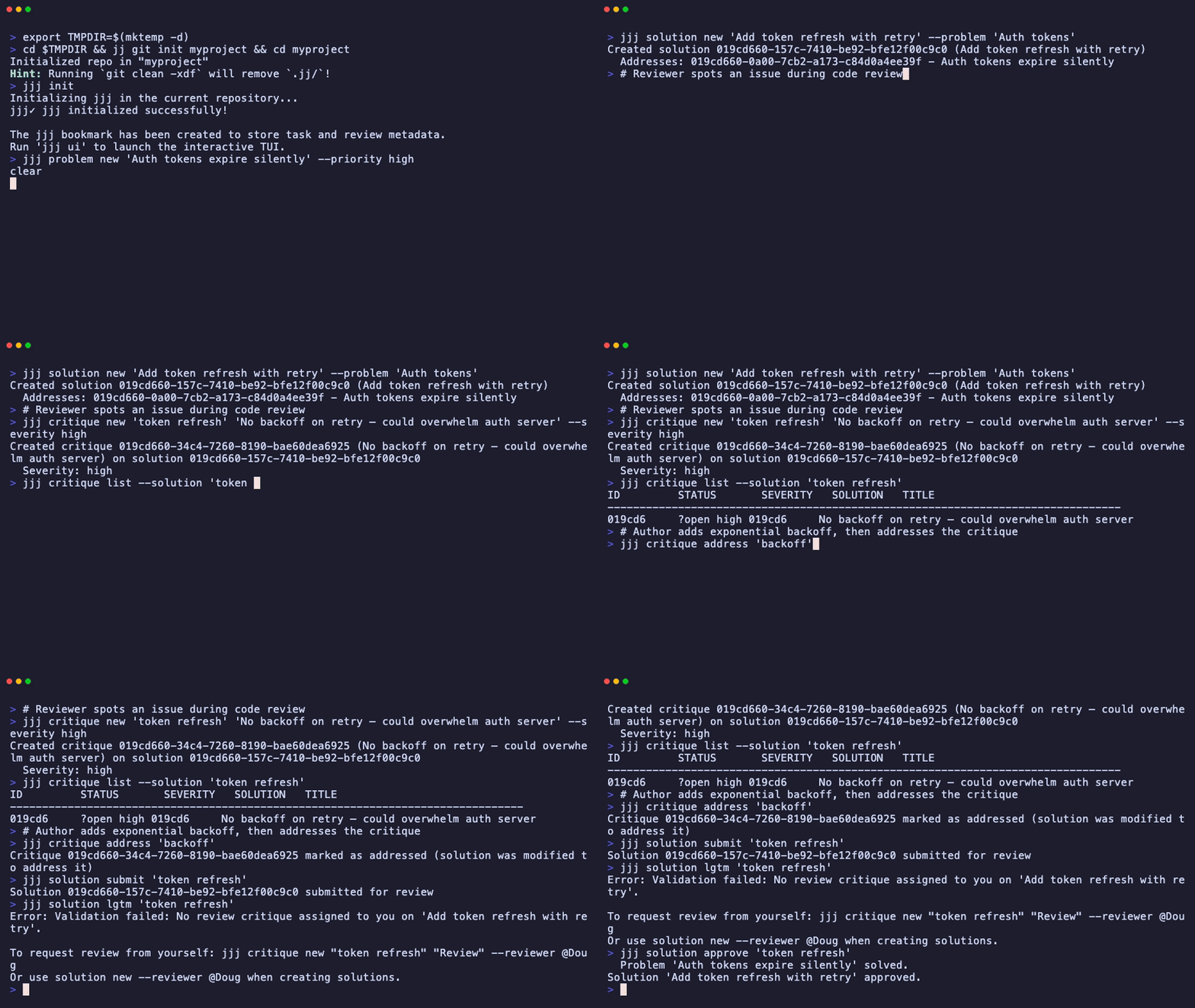
When you assign reviewers at solution creation (using --reviewer), jjj automatically creates review-type critiques for each reviewer. These critiques must be resolved (typically via jjj solution lgtm) before the solution can be approved.
Comment Relocation
When code changes, jjj intelligently relocates comments using:
Exact match (fast path): Line number + content hash match
Fuzzy match: Similarity scoring finds new location (70% threshold)
Orphaned: Comment marked as unresolved if context disappears
This is powered by context fingerprinting using SHA-256 hashing.
Basic Workflow
1. Assign Reviewers
You can assign reviewers when creating a solution, or add them later using critiques.
Created critique 01958a: Review requested (reviewer: @alice)
2. Reviewer: Examine the Solution
Alice receives a notification and wants to review the code.
Fetch and Checkout
Terminal window
# 1. Fetch latest changes from remote
jjgitfetch
# 2. Check out the change to review
jjnewkpqxywon
Review the Solution Context
Before looking at code, Alice can understand the solution’s context:
Terminal window
# See what problem this solution addresses
jjjsolutionshow"JWT tokens"
# See any existing critiques
jjjcritiquelist--solution"JWT"
Run Tests
Terminal window
cargotest
npmstart
3. Reviewer: Raise Critiques or Sign Off
After examining the solution, Alice has two paths.
If issues are found: raise a critique
Critiques are the formal mechanism for identifying problems with a solution. They must be resolved before the solution can be approved.
Terminal window
# Design-level critique
jjjcritiquenew"JWT tokens""JWT tokens stored in localStorage are vulnerable to XSS"\
--severityhigh
# Code-level critique with file location
jjjcritiquenew"JWT""Password comparison is not constant-time"\
--severitycritical\
--filesrc/auth/password.rs\
--line42
See the Critique Guidelines for severity levels and how to write effective critiques.
If the implementation looks correct: sign off (LGTM)
When a reviewer approves the solution, they sign off with a single command:
Terminal window
jjjsolutionlgtm"JWT tokens"
This addresses the reviewer’s open review critique and records the sign-off with a timestamp.
4. Author: Respond to Critiques
Check what critiques are open:
Terminal window
jjjcritiquelist--solution"JWT"--statusopen
For each critique, address it, dismiss it, or validate it:
Terminal window
# Fix the issue and mark as addressed
jjjcritiqueaddress"constant-time"
# Or dismiss with explanation
jjjcritiquereply"localStorage""The token is stored in an httpOnly cookie, not localStorage. See the solution's approach section."
jjjcritiquedismiss"localStorage"
After addressing critiques, request re-review if needed by creating a new review critique:
Terminal window
jjjcritiquenew"JWT""Re-review requested after fixes"--reviewer@alice
5. Submit and Approve
Once your solution is ready for review, submit it:
Terminal window
jjjsolutionsubmit"JWT tokens"
This changes the solution status to submitted, signaling it is ready for critique.
Once all critiques are resolved and reviews are in, approve the solution:
Terminal window
jjjsolutionapprove"JWT tokens"
jjj solution approve checks that all critiques are resolved (addressed, dismissed, or validated), including review critiques from assigned reviewers. If any check fails, it explains what is still needed. Use --force to bypass the gates in emergencies (this sets the force_approved flag on the solution).
Unified Gate to Approval
jjj uses a unified critique model where all feedback — including review requests — are critiques:
Critique Type
What it represents
How to resolve
Regular critique
A flaw or issue in the approach
Address, dismiss, or validate
Review critique (has --reviewer)
A review request from a specific person
Reviewer addresses it (LGTM) or raises issues
All critiques must be resolved before a solution can be approved. Review critiques are resolved when the assigned reviewer signs off (via jjj solution lgtm).
This unified model means:
A solution with any open critique (regular or review) cannot be approved
Review requests and issue critiques follow the same lifecycle
The --reviewer field distinguishes review requests from issue critiques
Landing Changes
Since jjj decouples review from the forge (GitHub/GitLab), “merging” is updating the main branch.
Direct Landing
Terminal window
# Rebase onto latest main
jjgitfetch
jjrebase-rkpqxywon-dmain
# Advance main bookmark
jjbookmarksetmain-rkpqxywon
# Push
jjgitpush-bmain
jjgitpush-bjjj# Push review metadata
Hybrid Workflow (GitHub/GitLab)
If your team requires Pull Requests for CI gating or compliance:
Push your change as a bookmark:
Terminal window
jjbookmarksetmy-solution-rkpqxywon
jjgitpush-bmy-solution
Open a PR on GitHub/GitLab targeting main.
Paste jjj solution show "JWT" output in the PR description to show it has been reviewed and critiques resolved.
Merge via the forge’s UI.
In the hybrid flow, review and critique happen in jjj. The GitHub PR is used for CI checks and the merge button.
The original code context is gone. jjj detects the content change and marks the critique’s location as orphaned, signaling that the code was modified (likely in response to the critique).
Best Practices
Review Early, Review Often
Request reviews for work-in-progress solutions to get feedback before you invest heavily in an approach.
Keep Solutions Focused
Smaller solutions are faster to review and easier to critique precisely. Aim for solutions that address one problem clearly.
Use Solution-Based Bookmarks
Name your jj bookmarks using a meaningful name to make changes easy to find:
jj bookmark set solution/jwt-auth
Respond to All Critiques
Every critique must be resolved before acceptance. Either:
Fix the issue and mark as addressed
Reply with your reasoning and dismiss
Acknowledge the flaw and validate (then withdraw the solution)
Write Clear Descriptions
Include context in your solution’s approach field so reviewers understand the “why”:
jj describe -m "Add bcrypt password hashing
Replaces SHA-256 with bcrypt for better security.
Uses DEFAULT_COST (12) for work factor.
Addresses: password security problem"
Troubleshooting
Critique Locations Not Relocating
If critique locations do not update after rebase:
Check context: Did you completely rewrite the section?
View orphaned critiques: jjj critique list --solution "JWT"
Re-create if needed: Raise a new critique at the correct location
Approve Fails
If jjj solution approve reports unresolved critiques or missing sign-offs:
Terminal window
# Check what is blocking
jjjcritiquelist--solution"JWT"--statusopen
jjjsolutionshow"JWT"# Shows reviewer and sign-off status